Product backlog vs. sprint backlog vs. release backlog
Learn how to use each type of backlog to organize work for delivery
Last updated: March 2026
Strong backlog management helps product teams manage delivery efficiently. This guide is for product managers, engineering leads, and anyone responsible for planning and prioritizing work. It explains the differences between three types of backlogs, who owns them, and how to keep work moving.
Every product team is responsible for capturing new ideas and requests for enhancements. These inputs are what drive business innovation and a collaborative team environment. But you need to do more than just be a sounding board for a lot of ideas. You need a way to gather and evaluate requests for your current roadmap. In order to manage ideas and active work, most product teams use some sort of backlog.
There are three main types of backlogs — product, sprint, and release. Here is a quick overview:
Product backlog: a dynamic list of all product work, continuously updated based on priorities and feedback
Sprint backlog: nests within the product backlog and contains user stories you assign to specific sprints
Release backlog: holds features you need to implement for a particular release
We will explore each one in more detail below. Feel free to jump ahead using these links:
Backlog basics: Why product teams use them
The concept of a backlog is rooted in agile methodologies. Many teams use adaptive planning techniques to continuously prioritize what to build and when. However, it is now common even for teams that do not follow a strict agile approach to use backlogs for organizing and prioritizing work items.
Requests for new features and enhancements to existing functionality can be added to a backlog and ranked based on business value, for example. This approach makes it easy for product managers to quickly prioritize the most important work.
It can also be useful to create backlogs for additional planning stages after feature requests are captured. This helps you narrow the list of what you want to implement — so you can focus on prioritizing and wait to build out requirements as you get closer to when you plan to ship.
How to use product backlogs, release backlogs, and sprint backlogs
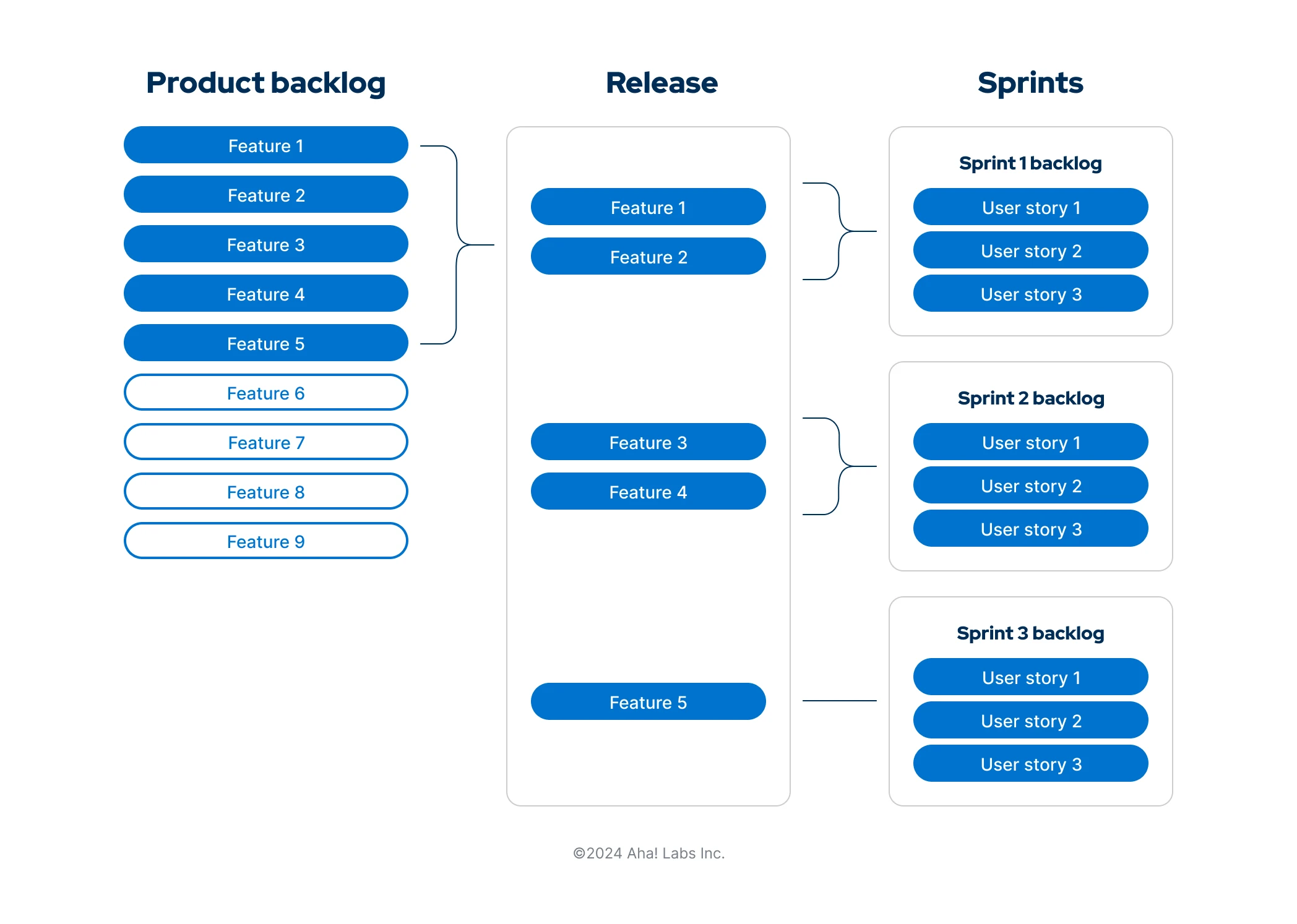
Understanding the difference between the three main types of backlogs and when to use each helps you deliver against your product roadmap in an incremental and iterative way. The graphic below illustrates each type. It highlights how creating product, release, and sprint backlogs can help you define the most important work items to be completed at different stages in your planning process:
You can use all three together to help streamline your product planning process. Familiarize yourself with the key elements of each backlog so you can confidently decide when to use each type:
Product backlog | Release backlog | Sprint backlog | |
Purpose | Define and prioritize which features should be worked on in upcoming releases. | Define which features need to be completed within a release. | Define which user stories need to be completed within a sprint. |
Owner | Product managers decide which work items go into the product backlog, ensuring each item delivers the highest value. | Product managers collaborate with the engineering team to set the scope of a release based on the capacity of the team. | The development team decides how many sprints will be required for a release and how many user stories they can commit to in each sprint. |
Work items | Product backlogs contain product features. A product feature is a slice of business functionality that has a corresponding benefit or set of benefits for the product's end user. | Release backlogs also contain product features. These are pulled from the product backlog. Each feature should be small enough to complete in a single release cycle. | Sprint backlogs contain user stories. A user story describes a product feature from the perspective of the end user and clearly defines a software requirement. |
Duration | Ongoing | Duration of each release | Duration of each sprint |
Estimating | Product backlog items are estimated in points or time based on the difficulty and effort required to implement them. | A max point or time capacity is set for each release. The release date and number of features included in a release backlog is determined by past velocity and resources available. | User stories are estimated in story points or time. The development team uses their past velocity and current capacity to determine a max story point number or time value for each sprint. |
Prioritizing | Compare features in your product backlog to confirm their strategic importance. Use scorecards with multiple metrics to evaluate influential factors like business value and effort. | Prioritize release backlog items based on the business value they will deliver and the effort required to complete them. It is important to use linear rank ordering (i.e., 1, 2, 3, 4) to avoid inflation of priority. | Prioritize user stories based on how critical the functionality is and the estimate. This ensures it is easy to decide which stories can be pushed out into another sprint if they cannot be completed. |
Refining | Product managers keep work items moving forward by continually gathering and prioritizing feedback. | Product managers define all acceptance criteria — so the problem the functionality will solve is clear. They check that the scope of work aligns with the team's capacity to deliver the release. | Development teams have a planning meeting before each sprint. They review the release backlog and decide which user stories to complete in the upcoming sprint. |
Reporting | Create a report on feature categories, themes, and scores to review your product backlog. Use this view to show the big picture of feature priority. You will see which low-scoring features should be revisited to determine if they should move up in value. | Monitor the real-time progress of a release with a release burndown chart. See feature status, burnup, and burndown measured against pre-determined time frames. This shows the amount of remaining work the team needs to complete to stay on track. | Track sprint progress and work that is remaining using a sprint burndown chart. Use this view during the daily scrum meeting to make sure the team is on track and will complete all user stories in the sprint. |
How do you order and manage your backlog?
Product managers are responsible for setting product strategy and deciding what features to build in order to achieve overall business goals. These features are stored in a product backlog — along with bug fixes and other technical items — that need to be worked on in the future. Each feature includes a high-level description of the desired user experience.
A product backlog requires continuous refinement as new items are added and priorities change. As features are prioritized for implementation, each one is then moved to a release backlog. Here, the requirements for each feature are defined in greater detail. The team also estimates the effort needed to deliver each feature in time or story points. This information is used to set the overall scope of a release based on the team's capacity.
Once release planning is complete, the engineering team divides the work into sprint cycles. Features in the release backlog are broken down into user stories that are small enough to be completed within a sprint. User stories are then moved into a sprint backlog. This helps the team understand exactly what needs to be completed during each iteration of work.
Related:
How to use tools like Aha! to manage your backlog
Backlogs help product managers organize what to build and when. Years ago, this work might live in various spreadsheets. But today many teams manage their product, release, and sprint backlogs in product management tools like Aha! software.
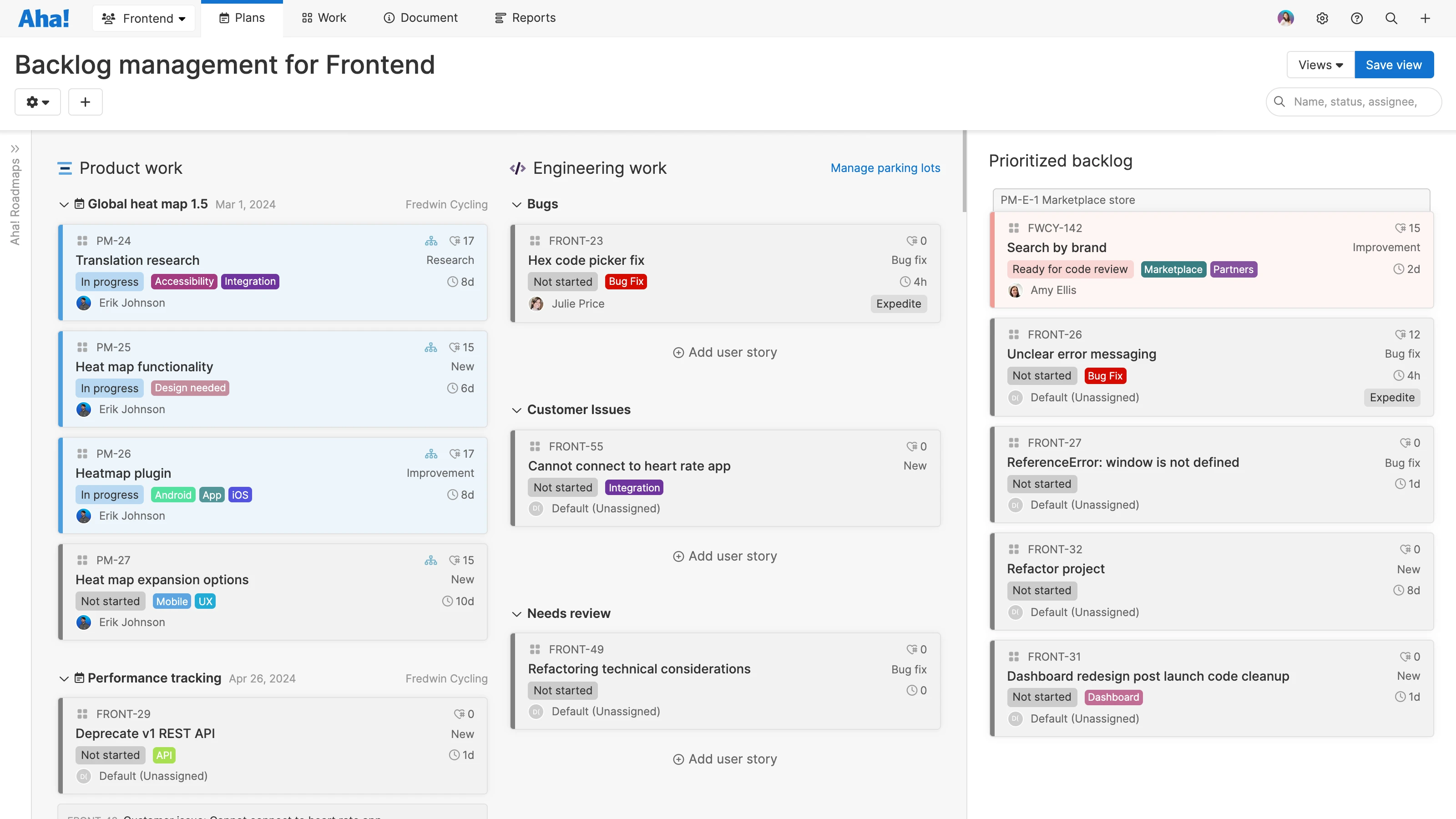
For example, you can use Aha! Roadmaps to define features and plan releases, and Aha! Develop to coordinate work with the development team. It is easy to move work directly from one backlog to the next. Because everything is connected, you always have an up-to-date view of priorities and progress.
FAQs about backlog types
Product managers own the product backlog. They decide which work items go into it and confirm that each one is prioritized to deliver the most value. The development team owns the sprint backlog. They decide how many user stories they can commit to in each sprint and which ones to include.
A product backlog item is typically a product feature. Each item represents new functionality or enhancements that provide a clear benefit to your customers. A sprint backlog contains user stories that describe those features from the user’s perspective — including the functional requirements the development team will build during a specific sprint.
Typically, the same feature will move from the product backlog into the release backlog, and then the sprint backlog — even if its format and details change in between.
Product backlog refinement is continuous. Product managers add new items, gather feedback, update estimates, and adjust priorities as plans evolve. The sprint backlog is created during sprint planning. The development team reviews the release backlog and selects the user stories they can complete in the upcoming sprint. The goal is to clear the sprint backlog by the end of the sprint.