Elle, the Aha! AI assistant, helped create this beautifully branded ideas portal in seconds.
Create an ideas portal that matches your brand


Every interaction a customer has with your company shapes how they feel about your product. And your ideas portal is a key way customers provide feedback. This is where users share what they need, vote on other ideas, and feel heard — making it one of the most powerful tools a product team has for staying close to customer needs. So of course, you want your portal to match your design style and feel like a natural extension of your product.
With Elle (the Aha! AI assistant), you can now brand your portal in seconds.
Let Elle match your ideas portal colors to your unique look — no hex codes or custom CSS required.
Brand your ideas portal faster
You could already add a logo and choose a single theme color for your ideas portal. But anything beyond that meant looping in a developer to work through color settings one by one.
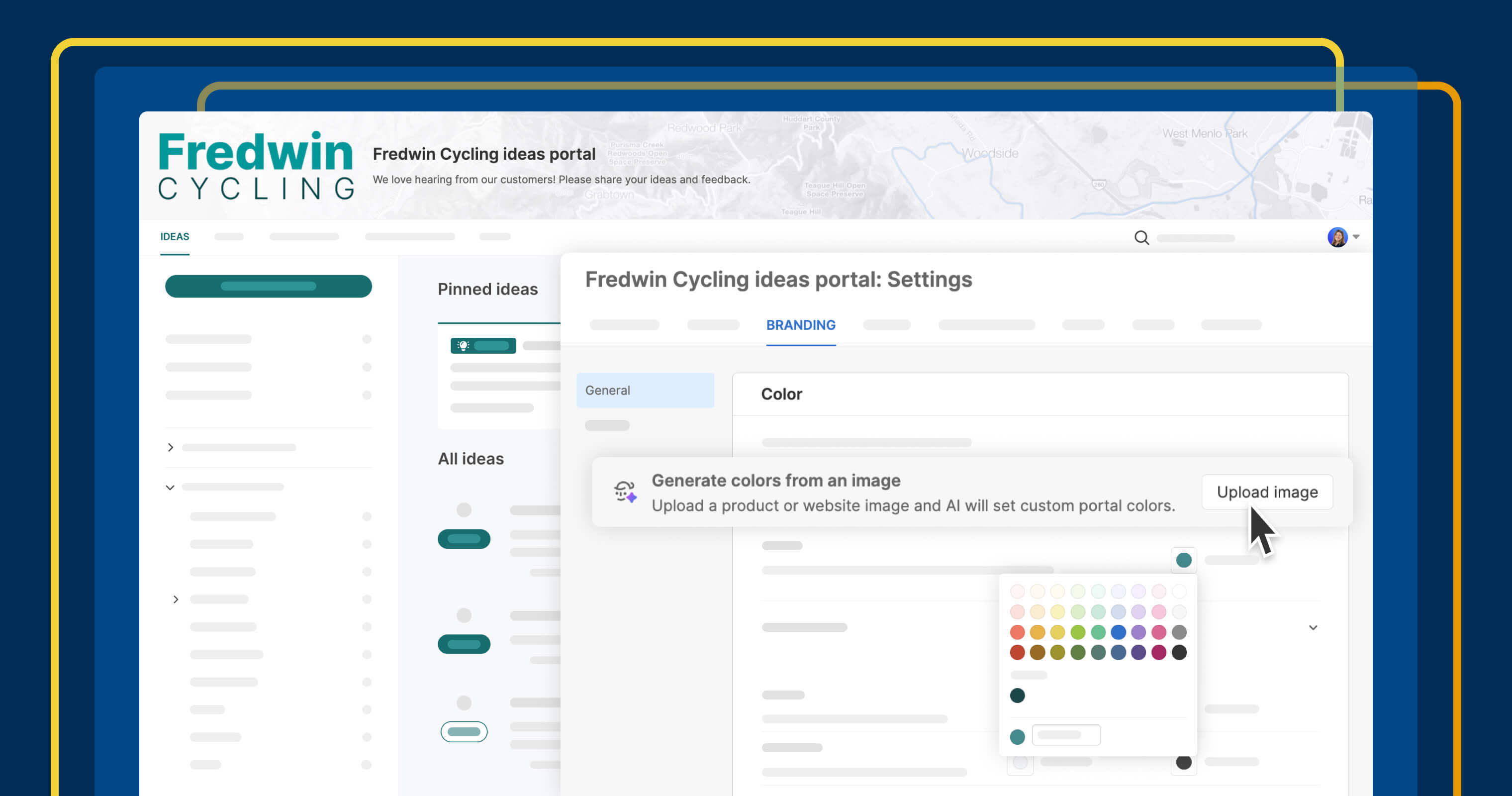
With today's update, you can upload a screenshot of your website or product, and Elle will generate portal colors based on the image. Elle applies suggestions across headers, links, buttons, text, and backgrounds. From there, you can fine-tune individual settings for the exact look you want.
Here is what is possible for portal branding:
Upload a screenshot: Grab an image of your website, product UI, or any branded asset and upload it directly from the portal's color settings.
Let Elle do the work: Elle analyzes the image and automatically suggests coordinated colors for each element across your portal.
Dial in the details: Expand the new detailed color settings to adjust any individual element until everything looks the way you want.
Watch what Elle can do with a single screenshot of the (fictitious) Fredwin Cycling website:
Portal branding with Elle is now available for all Aha! Ideas customers, whether you are using Aha! Ideas Essentials as a standalone product or as part of Aha! Roadmaps. You must be an administrator with customization privileges to update portal branding.
How to get started
Go to your portal's Settings Branding Colors.
Upload a screenshot so Elle can suggest colors based on your brand.
Review what Elle generated and adjust anything that needs it.
Use the Theme color picker to set a base color, or expand the detailed settings to fine-tune individual elements.
Pro tip: For the best results, upload a screenshot that includes navigation, buttons, and text (not just a large hero image). This helps Elle pick up on how your brand uses color across different elements
For more details, read the full support article.
There are even more ways to improve the experience customers have with your portal. Publish a Now, Next, Later roadmap with custom portal pages. Capture richer context with dynamic forms. Reach a global audience with portal translation. Together, these capabilities turn your ideas portal into a polished, fully branded extension of your product — and a place your customers want to return to.
Start a free trial of Aha! Ideas
Aha! Ideas is the best way to consolidate product feedback, engage your community, and prioritize what drives revenue. It also includes everything in Aha! Whiteboards Essentials and Aha! Knowledge Essentials to provide a comprehensive idea management solution. Sign up for a free 30-day trial of Aha! Roadmaps if you are interested in bringing together idea management and detailed planning. Or join a live demo to see why more than 1 million product builders trust our software to build lovable products and be happy doing it.