Timeline diagram template
Chronologically display milestones, events, achievements, and key developments
Use template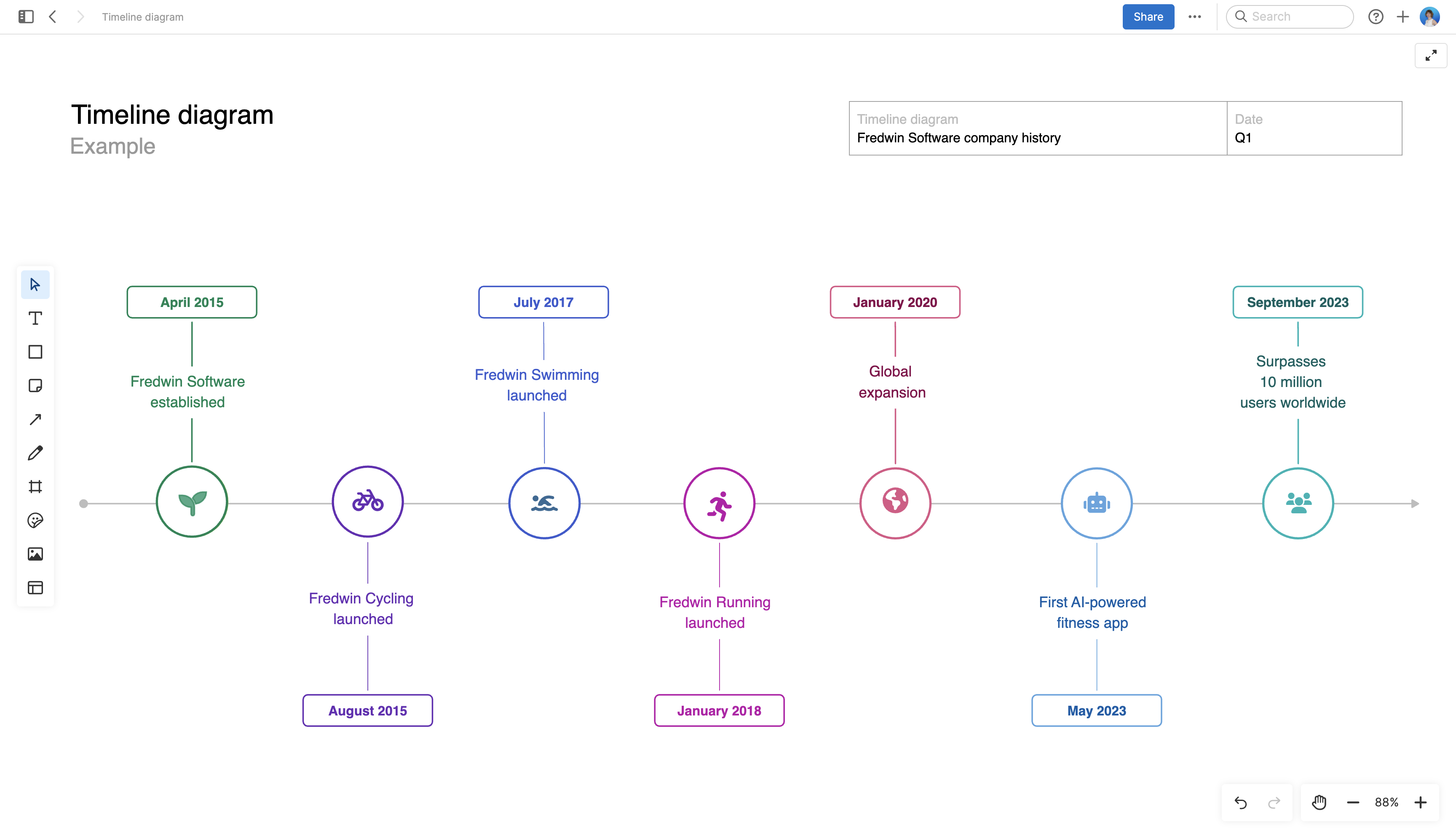
About the timeline diagram
Time marches on — accomplishments become milestones worth celebrating. A well-crafted timeline acts as a historical record, documenting important journeys and highlighting significant events along the way.
A timeline also serves as a communication tool — allowing teams to share their unique story, progress, and achievements with stakeholders. It can help reinforce the mission and vision of the team or project and inform future decision-making.
This diagram can be customized for your own context and brand. It is best suited for high-level visualizations. If you have more complex project planning needs, use the interactive timeline component in the shapes whiteboard menu on an Aha! whiteboard or try the Gantt chart in Aha! Roadmaps.
Best practices
Present a visually appealing timeline of your company history or project progress to internal teammates, clients, or partners.
Structure your timeline Customize the diagram to suit your needs. For example, you could use it to provide a history of events, highlight important points in time, or visualize project milestones. (To create a more detailed plan, use the interactive timeline component in the shapes whiteboard menu.)
Highlight key points in time Identify the major events, milestones, or tasks you want to include on the timeline. Then arrange them in chronological order for a clear and logical flow.
Add important details Name each event, using icons and color for visual emphasis. Include relevant details — such as a date and description — to make your timeline easy to understand.
Maintain accuracy Keep your timeline up-to-date, especially if you are using it to track key dates for a plan or project. Share your timeline with the team to align on the schedule.
FAQs
What is a timeline diagram template used for?
A timeline diagram template helps you present events, milestones, or phases in chronological order. Teams often use it to explain project progress, summarize a launch, document company history, or show how a plan evolved over time.
Who should use this timeline diagram template?
Product managers, marketers, project leads, and executives can all use this template when they need a simple visual narrative. It is especially useful when you want to communicate sequence and context without building a detailed project plan.
How detailed should my timeline be?
Focus on the moments that matter most to your audience. For an executive update, include only major milestones and decisions. For a team recap, you can add a bit more context, but keep each entry short enough to scan quickly.
What is the difference between a timeline diagram and a Gantt chart?
A timeline diagram is best for high-level storytelling and visual communication. A Gantt chart is better for managing detailed schedules, dependencies, and ongoing delivery work. Use this template when clarity and presentation matter more than task-by-task tracking.
Is this template free to use?
Yes. To use this timeline diagram template, sign up for a free 30-day trial of Aha! Whiteboards. (You can also try this template in Aha! Roadmaps if you need a complete product management solution.) Easily customize the template to suit your needs, then share it with as many people as you want for free to streamline collaboration.