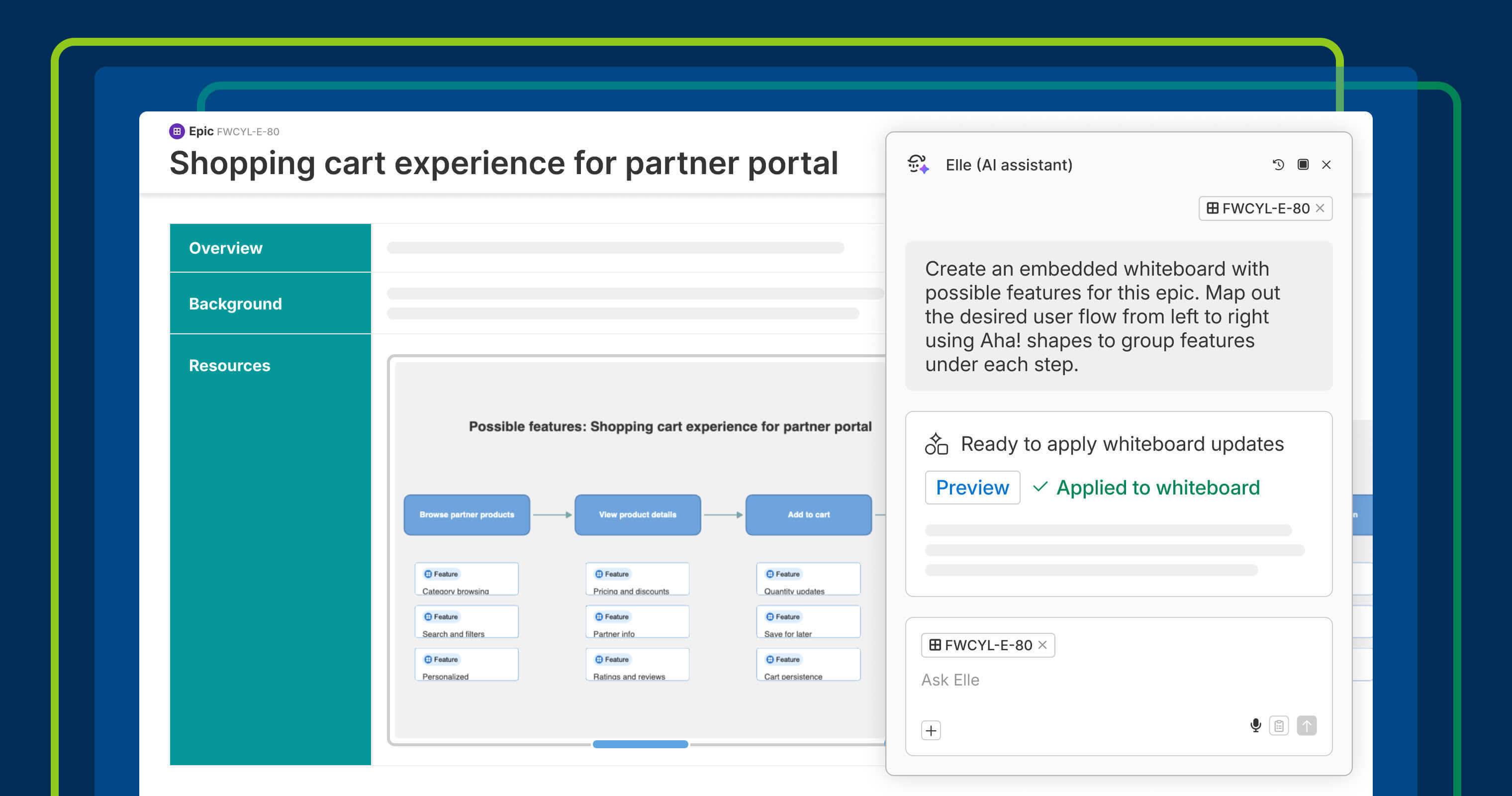
Turn product context into a visual workflow you can review, share, and refine.
Visualize the user journey on a whiteboard with AI


Words can only take you so far when you are exploring a new customer experience. Even with the best descriptions, it can be difficult to picture how everything connects from one step to the next. Today's update helps you quickly map out the full experience and determine the right path forward.
Ask Elle to create a user flow diagram on a whiteboard from your epic or feature description to visually map the desired experience before you build.
Turn existing context into a visual flow
You can already use Elle, our AI assistant, to generate interactive prototypes directly from a feature description. Now, you can also prompt Elle to add a whiteboard and visualize a user flow to help you think through how the solution should work.
Elle reviews the context provided and maps out the new customer experience, grouping features under each step in the journey. This makes it easier to understand how users would move through the flow — so you can review with the team, catch any gaps, and refine the solution before moving ahead.
As part of this update, we expanded what Elle can do on whiteboards:
Generate a whiteboard from any record: Use AI to instantly turn a record description into a visual layout.
Create Aha! shapes faster: Add multiple Aha! shapes (like features) to the whiteboard layout in one go.
Convert Aha! shapes into records: Turn items on the whiteboard into structured roadmap work.
Organize work with smart zones: Group records visually by status, release schedule, or other useful context.
In the example below, we are defining a new shopping cart experience for a fictitious application called Fredwin Cycling. The team asks Elle to explore a flow of possible features for an upcoming epic.
This update is now available to all Aha! users. Use it to quickly brainstorm and model new user experiences. From there, ask Elle to turn each feature card into a prototype to continue exploring and validating new concepts before you build.
How to get started
Go to the Aha! record you want to use as context.
Launch Elle and describe the whiteboard you want to create.
Open the embedded whiteboard and review the flow.
Prompt Elle to convert items into records and create smart zones to organize work.
Share the whiteboard with teammates to gather feedback and refine.
Example prompt for an epic record: "Create an embedded whiteboard with possible features for this epic. Map out the desired user flow from left to right using Aha! shapes to group features under each step."
📚 For more details, read the full support article.
Use this update to move quickly from written requirements to a visual plan. It helps you explore workflows, decide on the intended experience, and improve ideas before delivery begins. We have found it especially useful for early planning and strategic discussions. How will you use Elle to save time?
Start a free trial
Generating a whiteboard from a record is available to all Aha! customers. Our suite of tools includes Aha! Roadmaps, Aha! Discovery, Aha! Ideas, Aha! Whiteboards, Aha! Builder, Aha! Develop, Aha! Teamwork, and Aha! Knowledge. Use each product individually or combined to help teams deliver even greater value. Sign up for a free 30-day trial or join a live demo to see why more than 1 million product builders trust our software to build lovable products and be happy doing it.