Use spreadsheets in Aha! software to analyze data alongside your product plans.
Introducing spreadsheets in Aha! software


Your VP wants to see an ROI model for an upcoming feature. Imagine that you could create a spreadsheet for them right in the feature itself. Your calculations would actually stay connected to the work — and you could move from insight to decision in one place. With today's update, that workflow is now a reality.
Create live spreadsheets in Aha! software so your analysis stays tied to the decisions and plans it shapes.
Bring planning and analysis together
Aha! software already helps you capture all your product work — research, roadmaps, prototypes, and more — in one place. But when product teams need to work with numbers, they typically switch to Google Sheets or Excel. That means the calculations behind a decision are in a different tool than the decision itself.
Now you can create a spreadsheet in any editable rich text field in Aha! software, including notes and record descriptions. Use it to model costs, calculate ROI, track metrics, or organize structured data — right alongside the feature or initiative it applies to. Click any cell to enter text, numbers, dates, or formulas. Collaborators can access the spreadsheet when they open the record or note, and changes save automatically.
Here is what you can do:
Insert analysis inline: Create live spreadsheets in initiatives, PRDs, feature descriptions, and more.
Run contextual calculations: Use standard spreadsheet formulas to analyze data alongside your product decisions and plans.
Format for readability: Style cells with background color, bolding, and text alignment so your data is easier to scan and discuss.
Collaborate with ease: Anyone with access to the record or note can view the spreadsheet, and users with editing permissions can update it.
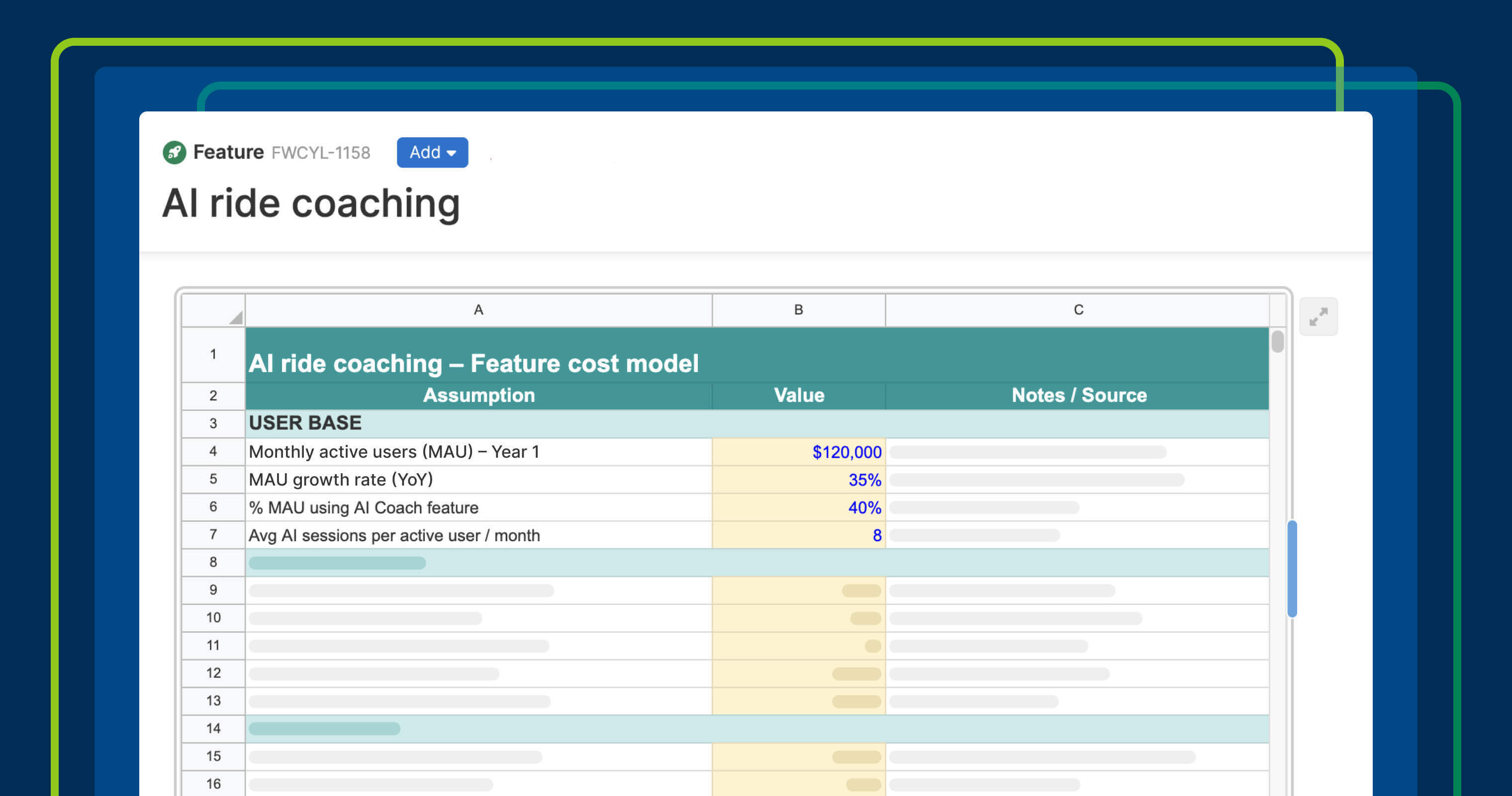
In the example below, a (fictitious) Fredwin Cycling team models ROI directly in a feature description.
Spreadsheets are available across Aha! software. The data is stored directly in the text field — there is no external file to manage or link to maintain.
How to get started
Open any record description, note, or other rich text field.
Click the + icon and select Spreadsheet.
Go full screen to access all the capabilities.
Click a cell to enter text, numbers, dates, or formulas.
Add or remove rows and columns from context menus on row and column headers.
Format cells to make important data easier to scan.
📚 For more details, read the full support article.
So go ahead and start running calculations directly in the records and notes that support your roadmap. When you tie the right context to your product plans, your team can move swiftly to deliver what customers value.
Start a free trial
Spreadsheet capabilities are available to Aha! customers. Our suite of tools includes Aha! Roadmaps, Aha! Discovery, Aha! Ideas, Aha! Whiteboards, Aha! Builder, Aha! Develop, Aha! Teamwork, and Aha! Knowledge. Use each product individually or combined to help teams deliver even greater value. Sign up for a free 30-day trial or join a live demo to see why more than 1 million product builders trust our software to build lovable products and be happy doing it.